Hardware Considerations
The media player is the core of every digital signage network. Its performance and stability directly influence the reliability of your communications and the quality of the experience. While both Windows and Android media players are available, our recommendation is to deploy Windows-based devices for the most feature-rich, manageable and scalable solution. They provide superior reliability, enterprise-grade security, and full access to the advanced features of the content management system (CMS), ensuring your solution is both future-proof and scalable. The below table outlines the features and properties of each of these systems, to assist outline which is most suited to the particular solution with the acceptable caveats noted.
| Windows-Based Media Players (Recommended) | Android-Based Media Players | SOC | |
|---|---|---|---|
| Performance & Playback | High-performance CPUs for smooth 4K/8K video, data-driven dashboards, video walls, and interactive content. | Limited to basic single-screen playback; struggles with advanced or interactive content. | Limited to basic single-screen playback; cost-effective but less powerful than Windows for heavy or interactive content. |
| CMS Features | Full compatibility with all CMS modules, add-ons, and integrations. | Restricted access to advanced functionality. | Restricted access to advanced functionality. |
| Reliability | Industrial-grade stability for 24/7 operation in enterprise environments. | Dependent on vendor firmware; less robust for mission-critical use. | More consistent due to manufacturer management, but still less robust than Windows-Based. |
| Integration | Broad support for sensors, IoT, databases, Office apps, and enterprise software. | Primarily suited for pre-packaged, standalone content. | Primarily suited for pre-packaged, standalone content. |
| Scalability & Management | Enterprise IT tools (remote monitoring, domain join, Group Policy) for easy central management. | Basic remote management; less suited to large networks. | Basic remote management; less suited to large networks. |
| Security | Enterprise-class security features (encryption, user control, Active Directory). | Updates vary by manufacturer; long-term security less predictable. | Updates vary by manufacturer; more predictable than standalone Android-Based. |
| Total Cost of Ownership | Higher upfront cost offset by stability, reduced downtime, and future scalability. | Lower upfront cost but generally higher long-term replacement/upgrade needs. | Lower total cost of ownership at the expense of functionality and other features above. |
Software Comparisons
We assess and compare software options based on the customer’s specific requirements, solution, and environment. This ensures the recommended platform is best suited to the intended use case, functionality, and future needs.
LED Considerations
When designing direct-view LED solutions, there are several key considerations to be taken into account, both in comparison to traditional screens or video walls, and other LED solutions.
- Visual Acuity & Viewing distance
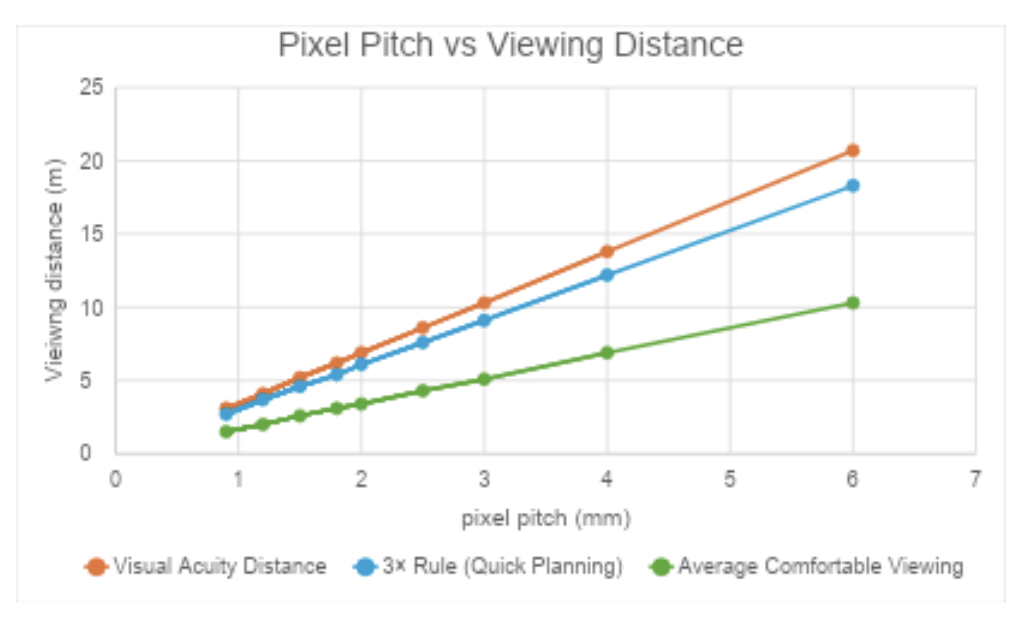
- ► Visual acuity is defined as the distance at which someone with 20/20 vision can no longer distinguish individual pixels. This is determined with the following formula: Pixel Pitch (mm)×3438=Distance (mm)
- ► 3× Rule (Quick Planning) can be applied for an approximation of visual acuity by rounding and multiplying as follows. This is more useful at smaller pixel pitches, and is always verified against visual acuity calculations.
- ► Average Comfortable Viewing Distance is determined from real-life installations and equates to roughly half of the visual acuity distance.
- ► Optimal Pixel Pitch is then guided by the closest typical viewing distance. A smaller pixel pitch (e.g., P1.5–P2.5) ensures fine detail for short-range indoor applications such as retail or corporate lobbies. Larger pitches (e.g., P4–P6 and beyond) are suitable for outdoor or large-format installations where viewers are further away.
- Viewing Angles
- ► High-quality LEDs ensure wide horizontal and vertical viewing angles, preventing colour shifts or brightness drop-off when viewers are off-centre.
- ► This is particularly important for retail, airports, and public spaces where audiences approach from multiple directions.
- Content Considerations
- ► Depending on the required content, and despite visual acuity and viewing angles, the technology and pixel pitch can also be influenced, for example:
- Fine Pitch LEDs deliver high resolution for close-proximity content (text, logos, fine detail).
- Mid to Large Pitch LEDs balance cost-efficiency with brightness and impact where resolution is less critical (stadiums, outdoor billboards).
- ► Depending on the required content, and despite visual acuity and viewing angles, the technology and pixel pitch can also be influenced, for example:
- LED Construction Technologies
- ► SMD (Surface-Mount Device):
- Most common technology.
- Offers strong colour consistency and good brightness.
- Proven reliability and cost-effective.
- Sensitive to external damage due to construction, useful when safely protected or out of reach.
- ► GOB (Glue on Board):
- Adds a transparent epoxy coating over LEDs.
- Improves durability, impact resistance, and dust/moisture protection.
- Easy to clean.
- Useful for high-traffic areas or portable applications.
- ► COB (Chip on Board):
- Next-generation technology where multiple chips are directly mounted to the board.
- Allows ultra-fine pixel pitch, excellent heat dissipation, higher contrast, and even stronger protection.
- Premium choice for close-view, high-resolution indoor displays.
- ► SMD (Surface-Mount Device):
- Modules vs. Cabinets
- ► Modules are small, interchangeable LED panels that allow flexible design shapes and easy maintenance. Ideal for creative or curved installations.
- ► Cabinets house multiple modules within a rigid frame, offering structural stability, faster installation, and better long-term alignment.
- ► Choice depends on whether the priority is design flexibility (modules) or speed, alignment and durability in deployment (cabinets).
- Pixel Pitch & Viewing Distance Guidelines (meters only)
Pixel Pitch (mm) Visual Acuity Distance 3× Rule (Quick Planning) Average Comfortable Viewing 0.9 mm 3.1m 2.7m 1.5m 1.2mm 4.1m 3.7m 2.0m 1.5mm 5.2m 4.6m 2.6m 1.8mm 6.2m 5.4m 3.1m 2.0mm 6.9m 6.1m 3.4m 2.5mm 8.6m 7.6m 4.3m 3.0mm 10.3m 9.1m 5.1m 4.0mm 13.8 12.2m 6.9m 6.0mm 20.7 18.3m 10.3m